

Compound Design
Draw analogs one at a time and compare each with the referenceStart from a ligand whose bound pose you know (REF), draw analogs in the editor, and see each one you add scored in REF's place within seconds, side by side with REF. Properties and the core check are free while you draw, and every added compound is laid on REF's core, refined by gnina in the pocket and checked for interactions.
GNINA 1.3.1 with RDKit core overlay and PLIP · Doc updated Oct 28, 2026
- Input
- Structure, reference ligand, drawn compounds
- Output
- Poses, scores, interactions
- Engine
- GNINA + RDKit
- Cost
- 1 credit per compound, REF included
- Turnaround
- Seconds per compound
When to use
- You have a structure with a bound ligand and want to see, one analog at a time, whether a change to it beats the original
- You want to watch how the scores and interactions move each time you change one side group, and pick the next structure from that
- You do not have a list of compounds yet, and would rather narrow the idea down by drawing than collect a file and submit it all at once
For an analog series you already have, submit it at once with Compound Alignment. For compounds that do not share a core with the reference, use Molecular Docking (Virtual Screening).
How it works
- 01Draw
The editor opens with the reference ligand (REF). Properties and the core check show for free as you edit, and Add · 1 credit sends the compound to be calculated.
- 02Overlay on REF
RDKit builds 10 3D shapes (conformers) and lays their core atoms on REF's.
- 03Minimize in place
gnina relaxes the pose in the pocket and a CNN rescores it, keeping one pose. PLIP finds its interactions, usually within a few seconds.
- 04Compare with REF
The result joins the table as a row, next to a REF row calculated the same way.
Input formats
| Item | Accepted | Notes |
|---|---|---|
| Receptor | PDB ID, or an uploaded .pdb, .pdbqt or .cif file up to 50 MB | Choose the chains to keep. Water is removed automatically |
| Reference ligand | A ligand in the structure, or a .sdf, .mol2 or .pdb file | Required. It sets the pocket and the bound pose, starts the editor and is the table's baseline (REF). An uploaded file needs 3D coordinates in the same frame as the structure |
| Compounds | Structures drawn in the editor, one at a time | There is no file upload. A structure already in the session is refused without a charge, naming the row it matches. A structure whose calculation failed can be added again |
| Session | One protein and one reference ligand | They cannot be changed once the session is open; to compare against another structure or reference, open a new session. Sessions stay in your project list and can be reopened to keep drawing |
A PDB crystal structure carries no bond orders (which bonds are single, double or aromatic). So when you choose a ligand from the structure as the reference, its standard structure is fetched from the RCSB Chemical Component Dictionary (CCD) to restore the bond orders before the editor and the REF calculation use it. If the crystal structure is missing some of the ligand's atoms or differs from the standard structure, the session does not start and asks you to upload the ligand as an SDF file instead.
Tutorial: drawing erlotinib analogs in EGFR
Erlotinib is a lung cancer drug that blocks EGFR, a kinase. In the crystal structure 1M17 it sits in the pocket where ATP normally binds, with its quinazoline (two fused six-membered rings) deep in the pocket and its aniline ring (the benzene ring on the NH) toward a side pocket. Where the Compound Alignment doc lays 10 analogs with a changed aniline ring on erlotinib at once, here you change the same positions one at a time and compare each with erlotinib. The structures you draw are the ones in the alignment example; this shows how to use the board and makes no claim about their activity. View example (EGFR) at the top of the page fills in the session wizard.
Open the session
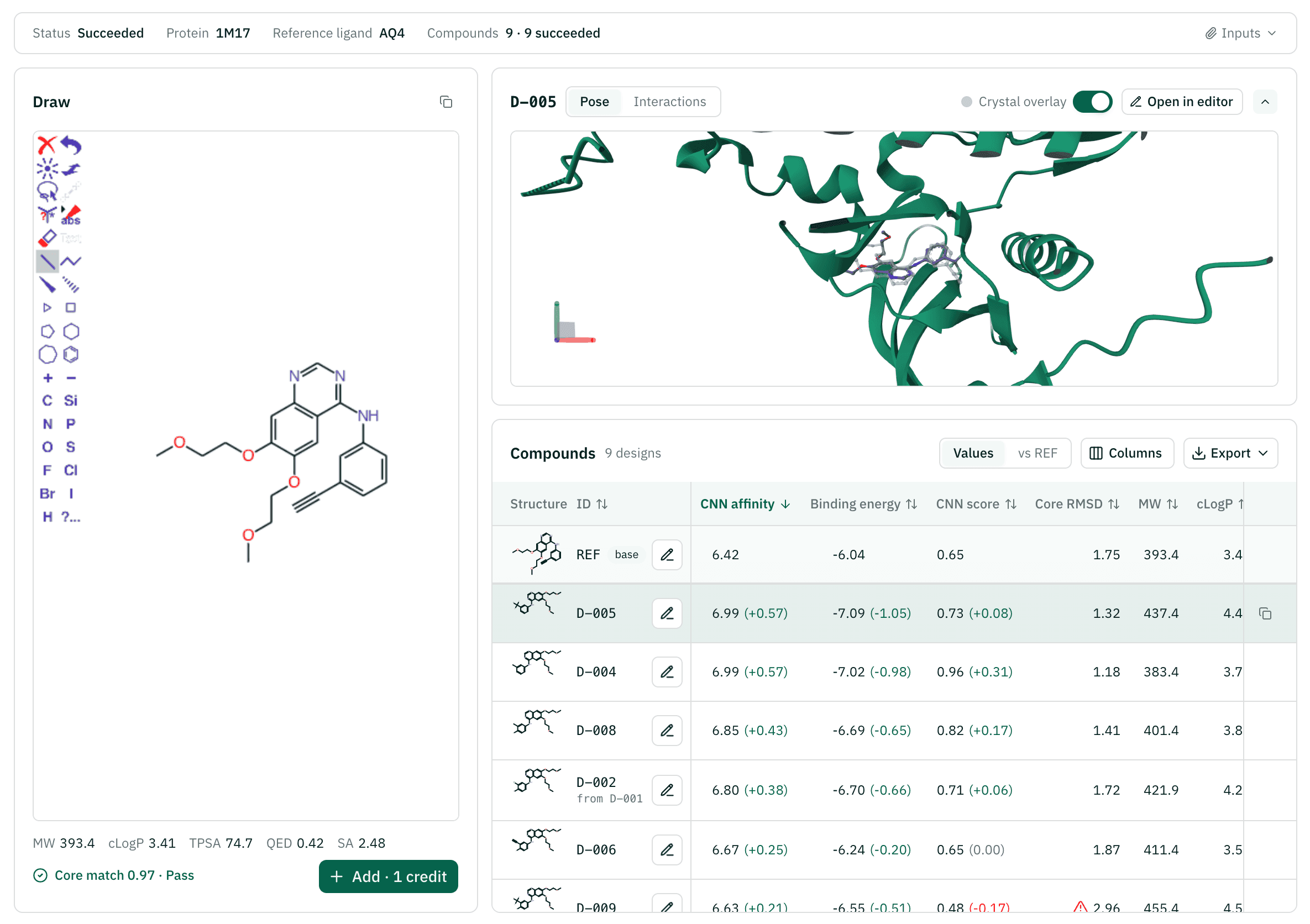
The Target Protein & Reference Ligand step has PDB ID 1M17, chain A and the reference ligand AQ4 (erlotinib), and the Project & Session step has the name "EGFR example". Start session · 1 credit opens the board: the editor on the left, the pose at the top right and the compound table below it. While REF is being calculated, the editor's place says "Calculating the reference ligand"; when it is done, the REF row at the top of the table gets its scores and the editor opens.
Draw the first analog
The editor holds erlotinib. Delete the ethynyl group (a triple bond, C≡CH) at position 3 of the aniline ring and put a chlorine (Cl) in its place. This is QZ-02 from the alignment example. Its properties and core check appear under the editor right away, and with the quinazoline and the aniline unchanged the check passes. Press Add · 1 credit.
Compare with REF
About 4 seconds later D-001 appears in the table and its pose at the top right. In the Values view, CNN affinity, binding energy and CNN score each carry their change from REF in brackets. Turn on Crystal overlay in the pose card to see where erlotinib sits in the crystal, in grey, and check by eye whether the analog stayed in the same place. The picture below is the board after all nine were added, with D-005 selected.
Change it and draw again
Open in editor on the D-001 row (or select the row and press E) brings its structure back into the editor. Add a fluorine (F) at position 4 of the aniline ring and add it. This is QZ-07 from the alignment example, and the new row D-002 reads
from D-001, so you can see where it started. In the same way you can try bromo, methyl and trifluoromethyl at position 3.Look at the interactions
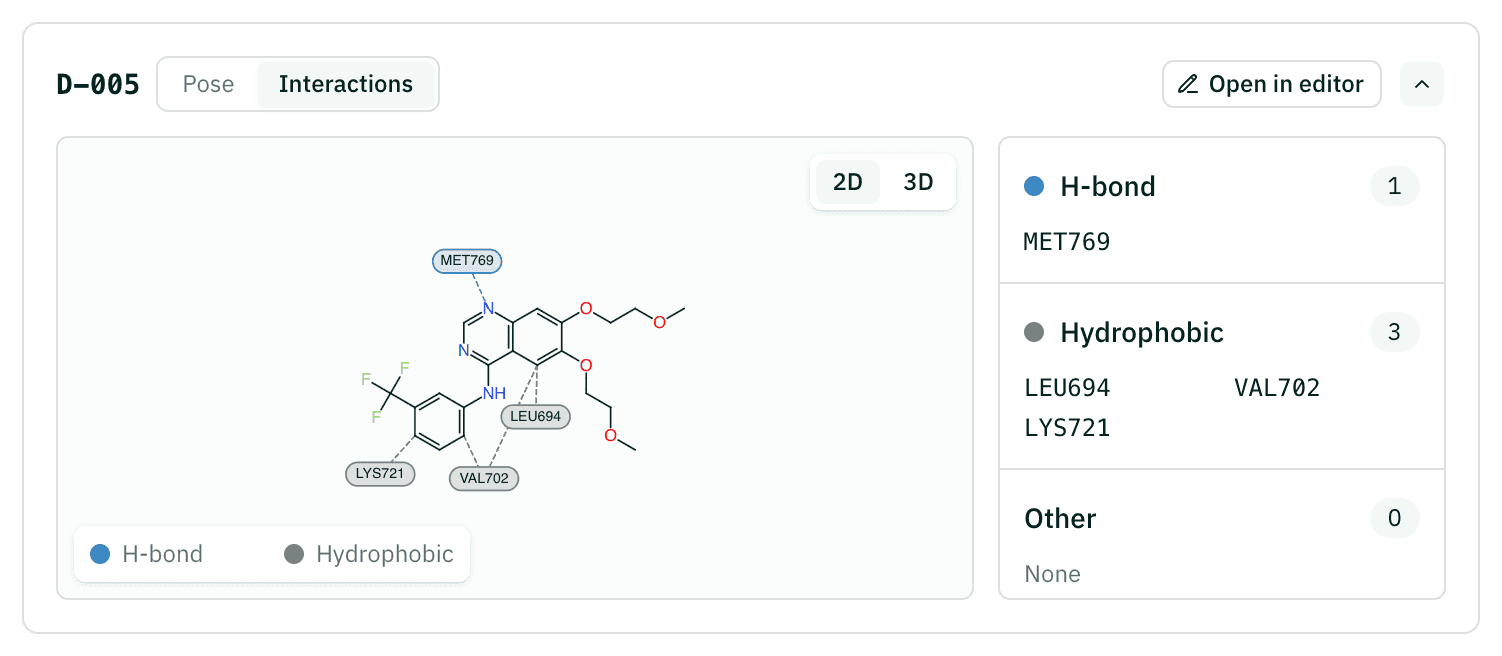
Select a row and open the Interactions tab in the pose card. The 2D map joins the surrounding residues to the compound, drawn the same way as in the table, with dashed lines; the 3D view draws the interactions on the pose in the pocket. Beside it (below it on a narrow screen) the residues are listed by kind: H-bond, hydrophobic and the rest.
Keep going
Export downloads the table (CSV) or the poses (SDF). Once the analogs you drew settle into a series, lay them all at once with Compound Alignment and compare them in its R-group table, or take the ones you pick to a target model to predict their activity.
Reading the results
| Column | What it is | How to read it |
|---|---|---|
| CNN affinity (pKd) | Binding strength predicted by the CNN | Higher means a tighter predicted binder. A difference of 1 is 10-fold |
| Binding energy (kcal/mol) | Physics-based score (ΔG) | Lower (more negative) is better |
| CNN score | CNN pose score (0–1): how likely the pose is the real binding mode | Higher means a more trustworthy pose |
| Core RMSD (Å) | Average distance of the compound's core atoms from REF's core atoms | Lower means the core stayed where REF sits. Above 2.0 Å a warning icon goes before the value: the pose may have drifted from REF's, so its score is hard to compare with the others' |
| MW, cLogP | Molecular weight, lipophilicity | The same values you saw while drawing |
| TPSA, QED, SA | Polar surface area, drug-likeness (0–1), synthetic accessibility (1–10) | Turn them on from the Columns menu. Exports always include every column |
The REF row stays pinned at the top of the table whatever the sort, so the baseline is always in view. Values | vs REF above the table switches the view. Values writes the change from REF in brackets after the value in three columns, CNN affinity, binding energy and CNN score (7.45 (+1.03)), green when it is better and red when it is worse. vs REF shows only the change in every metric cell of the design rows. The change is taken after rounding both values to the digits the table shows. So that colour is not the only signal, each column header's tooltip says "Higher is better" or "Lower is better".
A row still being calculated reads "Calculating…". A failed row goes to the bottom of the table with its reason and "1 credit refunded"; three or more failed rows fold into one line.
The pose card shows the selected compound's pose in the pocket. Crystal overlay adds REF's position in the crystal structure in grey. The Interactions tab shows, as a 2D map and in 3D, the H-bonds, hydrophobic contacts, π-stacking, π-cation, salt bridges, halogen bonds, metal complexes and water bridges that PLIP finds in that pose. If no interactions are found, the scores still stand.
Export as CSV gives one row per compound, REF and failed rows included, with the table's columns plus the TNCO score, core match, H-bond donor and acceptor counts, status and failure reason. SDF joins the poses of the compounds that succeeded and carries the same values as properties.
Example result: erlotinib analogs drawn in EGFR 1M17
A session with QZ-02 to QZ-10 from the alignment example added (2026-10-28, 9 credits, 4 to 5 seconds per compound). The table shows REF and the top 4 by CNN affinity, with the same scores as the alignment example.
| ID | Alignment example | CNN affinity | Binding energy | CNN score | Core RMSD | MW | cLogP |
|---|---|---|---|---|---|---|---|
| REF | QZ-01 | 6.42 | -6.04 | 0.65 | 1.75 | 393.4 | 3.41 |
| D-005 | QZ-05 | 6.99 | -7.09 | 0.73 | 1.32 | 437.4 | 4.44 |
| D-004 | QZ-04 | 6.99 | -7.02 | 0.96 | 1.18 | 383.5 | 3.73 |
| D-008 | QZ-09 | 6.85 | -6.69 | 0.82 | 1.41 | 401.4 | 3.87 |
| D-002 | QZ-07 | 6.80 | -6.70 | 0.71 | 1.72 | 421.9 | 4.22 |
Cost and limits
| Compounds added | Credits (REF included) | Price |
|---|---|---|
| 1 | 2 credits | $0.02 |
| 20 | 21 credits | $0.21 |
| 100 | 101 credits | $1.01 |
Starting a session costs 1 credit for calculating REF, and each compound you Add costs 1 credit ($0.01), with no minimum. The properties and core check while you draw are free. The credit is deducted when the calculation starts, and if it fails (a timeout included) that 1 credit comes back in full. A structure the core check refuses, one already in the session and one that cannot be read are not added and cost nothing. If your balance is short, nothing is added and you are told the credits needed and your balance.
Up to 20 compounds can be calculating at once per person, across all sessions. Add more and you are asked to add them again once the earlier ones finish. The preview while you draw runs up to 60 times a minute and 3,000 times a day. A calculation that has not finished after 2 minutes is marked failed and its credit refunded.
Citations
If you use results from this workflow in a report or paper, please cite the methods below.
- McNutt AT, Francoeur P, Aggarwal R, Masuda T, Meli R, Ragoza M, Sunseri J, Koes DR. GNINA 1.0: molecular docking with deep learning. J Cheminform 13, 43 (2021). doi:10.1186/s13321-021-00522-2Minimizing and scoring the overlaid poses, CNN rescoring
- Ragoza M, Hochuli J, Idrobo E, Sunseri J, Koes DR. Protein-ligand scoring with convolutional neural networks. J Chem Inf Model 57, 942-957 (2017). doi:10.1021/acs.jcim.6b00740CNN scoring model
- Trott O, Olson AJ. AutoDock Vina: improving the speed and accuracy of docking with a new scoring function, efficient optimization, and multithreading. J Comput Chem 31, 455-461 (2010). doi:10.1002/jcc.21334Vina scoring function behind the binding energy
- RDKit contributors. RDKit: Open-source cheminformatics. Zenodo (2026). doi:10.5281/zenodo.591637Core matching, conformer generation, overlay and properties
- Dalke A, Hastings J. FMCS: a novel algorithm for the multiple MCS problem. J Cheminform 5, O6 (2013). doi:10.1186/1758-2946-5-S1-O6Maximum common substructure (MCS) search
- Bemis GW, Murcko MA. The properties of known drugs. 1. Molecular frameworks. J Med Chem 39, 2887-2893 (1996). doi:10.1021/jm9602928Murcko scaffolds, used when no other match is found
- Adasme MF, Linnemann KL, Bolz SN, Kaiser F, Salentin S, Haupt VJ, Schroeder M. PLIP 2021: expanding the scope of the protein-ligand interaction profiler to DNA and RNA. Nucleic Acids Res 49, W530-W534 (2021). doi:10.1093/nar/gkab294Protein–ligand interactions of the reported pose
- Bickerton GR, Paolini GV, Besnard J, Muresan S, Hopkins AL. Quantifying the chemical beauty of drugs. Nat Chem 4, 90-98 (2012). doi:10.1038/nchem.1243Drug-likeness (QED)
- Ertl P, Schuffenhauer A. Estimation of synthetic accessibility score of drug-like molecules based on molecular complexity and fragment contributions. J Cheminform 1, 8 (2009). doi:10.1186/1758-2946-1-8Synthetic accessibility (SA)
- Stamos J, Sliwkowski MX, Eigenbrot C. Structure of the epidermal growth factor receptor kinase domain alone and in complex with a 4-anilinoquinazoline inhibitor. J Biol Chem 277, 46265-46272 (2002). doi:10.1074/jbc.M207135200EGFR–erlotinib structure used in the tutorial (PDB 1M17)
FAQ
Run the Compound Design workflow yourself
Sign up and get 500 credits. No card required. You can also choose to get news about new models and workflows.