

TSAP (Boltz-2)
Target-specific activity prediction with a fine-tuned Boltz-2Predict how active your compounds are against one target. Use a model we have already tuned for a target, or train your own on your activity data: Boltz-2's affinity predictor is fine-tuned on your measurements, checked on compounds it never saw, then used to score new compounds.
Boltz-2 fine-tuning (TSAP pipeline v2.2) · Doc updated Oct 14, 2026
- Input
- Target + activity data, or a pre-trained model
- Output
- Predicted activity, model quality
- Engine
- Boltz-2
- Cost
- From 100 cr, quoted before submit
- Standard preset
- About 1 hour
When to use
- You have measured activities (IC50, Ki, Kd, EC50) for at least 30 compounds on one target and want to rank new ideas
- Your target is in the pre-trained catalog and you want quick predictions without your own data
- General docking or cofolding scores do not separate your actives well enough
A model is only as good as the data it learned from. Predictions for compounds very unlike the training set are less reliable. Always check the model's quality on held-out compounds before trusting its ranking.
How it works
- 01Place each compound
Boltz-2 builds structures of the target with each compound and keeps poses that sit in the reference ligand's binding site (residue-contact overlap, or core RMSD in High Accuracy).
- 02Split the data
Compounds that pass are split into training and a 20% holdout set, spread across the activity range. The holdout is never used for training.
- 03Fine-tune
Only Boltz-2's affinity head is trained, starting from its pretrained weights, so it learns your target's activity scale. The best epoch is kept; if training never beats the pretrained model, you get your credits back.
- 04Check and predict
The tuned model scores the holdout compounds to report its accuracy, then predicts the new compounds you submitted.
Input formats
| Item | Accepted | Notes |
|---|---|---|
| Model | A pre-trained catalog model, or train a new one | Pre-trained models fix their own settings and reference structure |
| Target (training) | 1–10 chains: sequence, 4-character PDB ID, or .pdb/.cif upload | From a structure you pick the chain to train on; the default is the longest. MSA, template and cyclic are optional per chain |
| Binding site reference (training) | A structure with a bound ligand: .cif, .pdb, .sdf, .mol or .mol2 | Required when you also predict new compounds. Water, ions and additives such as GOL are not offered as ligands |
| Activity data (training) | .txt, .csv or .tsv with a header row: SMILES, activity value, optional ID | At least 30 compounds. One unit per job (M down to fM, or values already on a p-scale) |
| Compounds to predict | .txt, .smi or .csv, one per line: SMILES, or ID then a tab then SMILES | At least one with a pre-trained model, optional when training |
Activity values are converted to the p-scale: pX = −log10 of the molar concentration, so 1 nM becomes 9.
Tutorial: predict EGFR activity with a pre-trained model
EGFR, the lung cancer target from the Virtual Screening and AI-Cofolding docs, has a pre-trained TSAP model in the catalog with PDB 1M17 as its reference structure, so you only need the compounds you want scored. Run example at the top of this page fills all of this in for you.
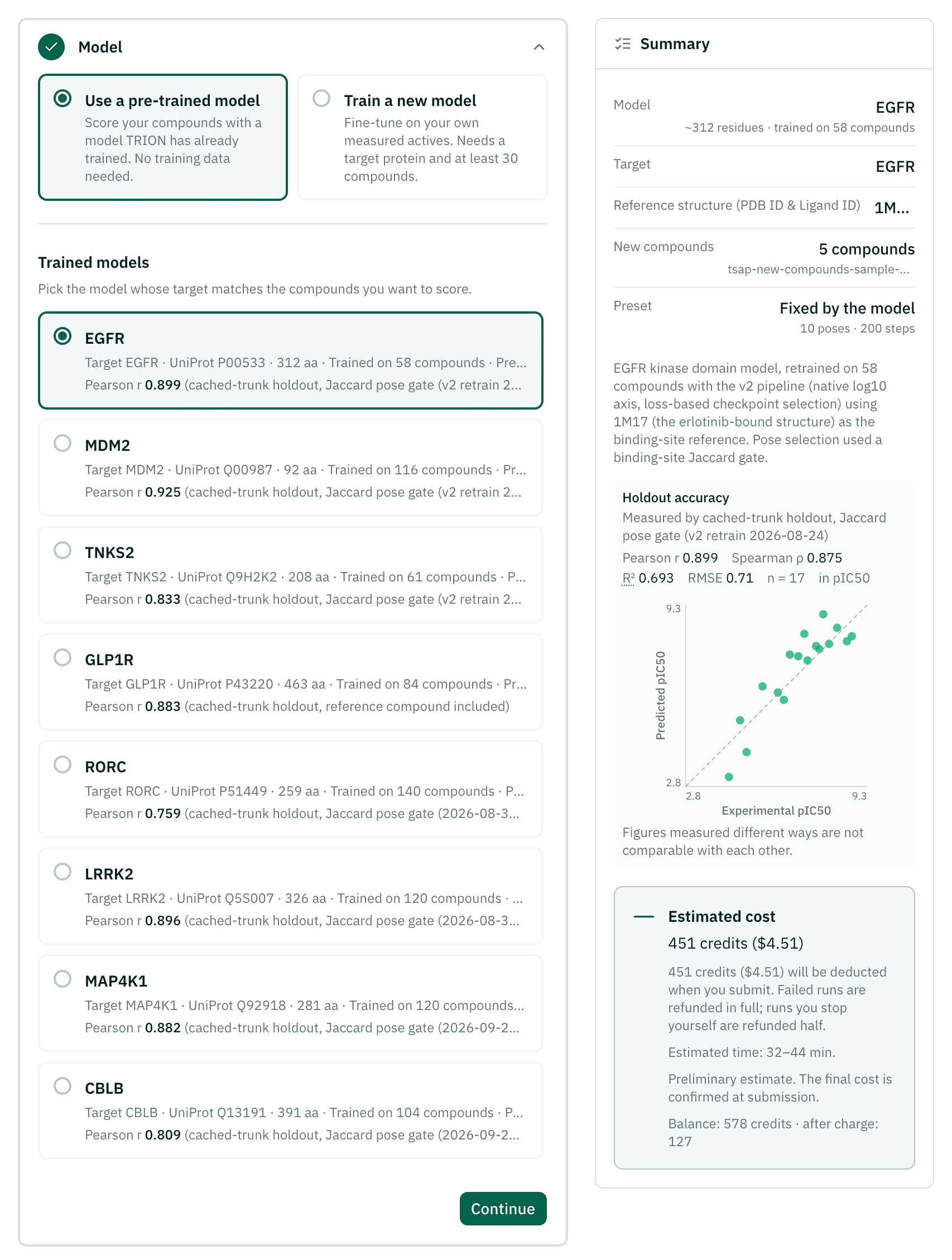
Pick the model
In Model, keep Use a pre-trained model and choose the EGFR card. It shows the reference structure, the number of training compounds and its accuracy on held-out compounds.
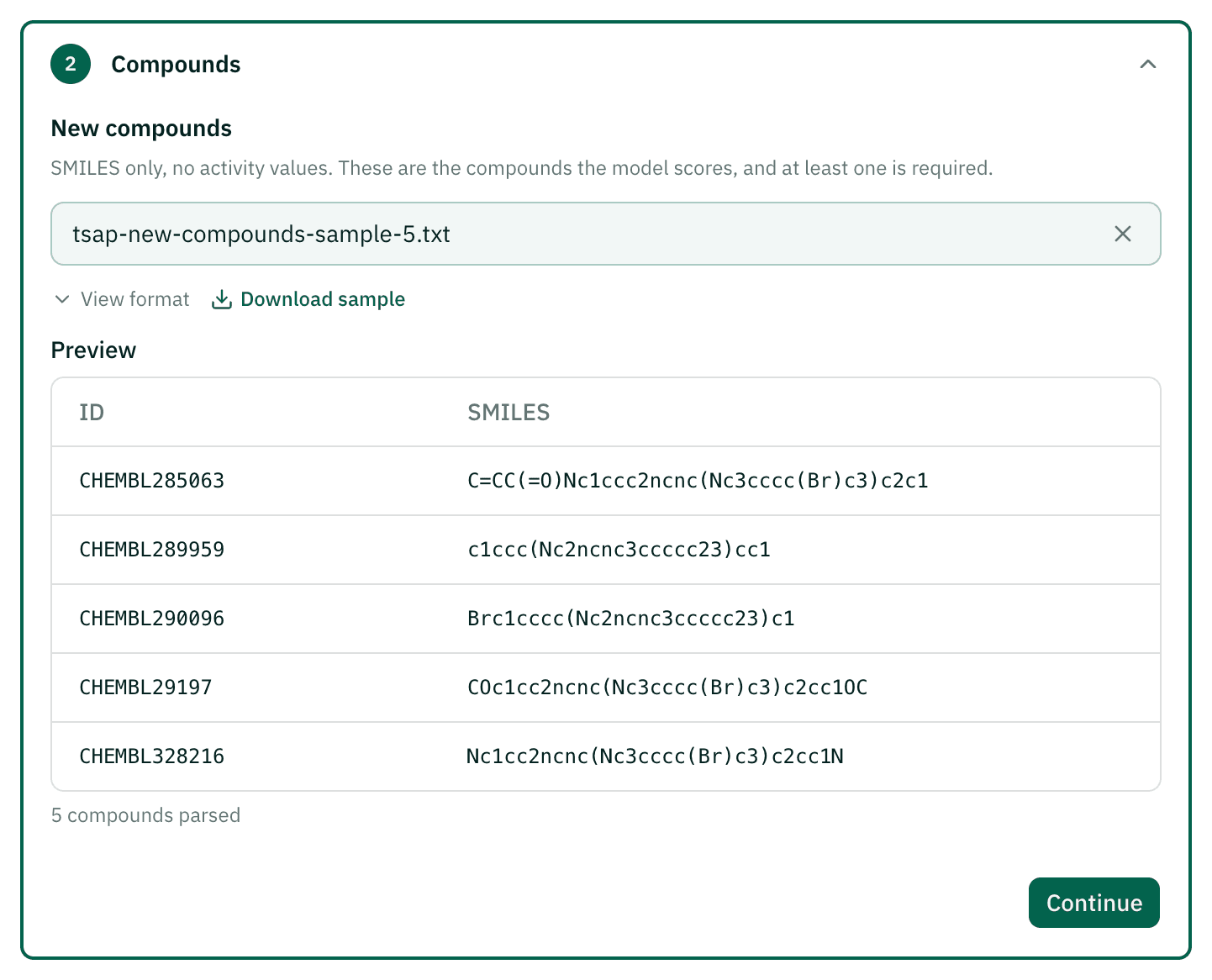
Add compounds
In Compounds, upload a file with one SMILES per line, optionally with an ID and a tab before it. The example uses five compounds from the EGFR sample file linked in the step; each compound adds GPU time.
Check the quote and submit
Advanced Settings are fixed by the model. In Project Settings, name the project, check the quoted credits and time, and submit.
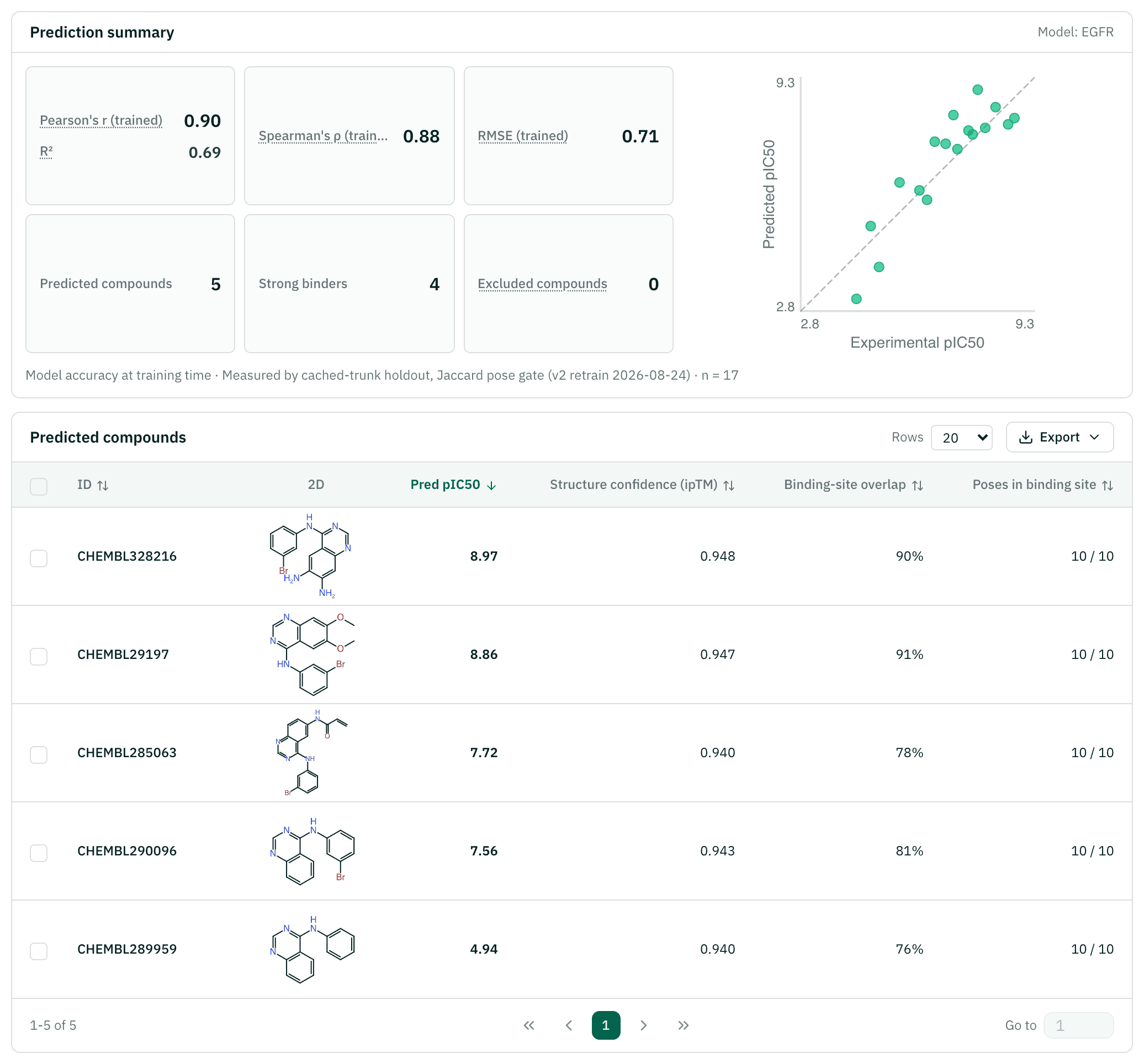
Read the predictions
Open the project. Sort by predicted activity, check structure confidence and the binding site overlap of each compound, and open a compound to see its pose.
Reading the results
| Value | Meaning | How to read it |
|---|---|---|
| Pred pIC50 (or pKi, pKd, pEC50, pActivity) | Predicted activity on the p-scale of your data | Higher is more active. 1 unit is a tenfold change. 7.0 and above is counted as a strong binder |
| Structure confidence (ipTM) | Boltz-2's confidence in the predicted complex (0–1) | Low values mean the pose, and so the prediction, is shakier |
| Binding site overlap (Jaccard) or Reference RMSD | How closely the pose matches the reference ligand's site | Compounds whose poses never reach the site are excluded and listed with the reason |
| Pearson r, R², Spearman ρ, RMSE | Model accuracy on the holdout compounds | Training runs show them for your model; pre-trained runs show the model's accuracy from when it was trained, not on your compounds |
| vs pretrained | Accuracy gain over Boltz-2 without fine-tuning | Shows whether fine-tuning helped |
With fewer than 8 holdout compounds, the accuracy numbers are marked as not reliable.
Example result: EGFR
A real job, shown read-only. Sign in to run the same setup yourself.
| Compound | Pred pIC50 | ipTM | Jaccard |
|---|---|---|---|
| CHEMBL328216 | 8.97 | 0.948 | 0.91 |
| CHEMBL29197 | 8.86 | 0.947 | 0.91 |
| CHEMBL285063 | 7.73 | 0.940 | 0.78 |
| CHEMBL290096 | 7.56 | 0.943 | 0.81 |
| CHEMBL289959 | 4.94 | 0.940 | 0.76 |
Cost and time
The price follows the GPU time the job needs: the number of compounds, protein length and sampling steps, plus a training step when you train. With a pre-trained model you only pay for prediction. The wizard shows the server's quote, and you pay exactly that at submit. The minimum is 100 cr (1 cr is $0.01).
| Preset | Poses, steps | Wizard's rough guide |
|---|---|---|
| Quick | 5, 100 | About 30 min |
| Standard | 10, 200 | About 1 hour |
| High Accuracy | 20, 200 | About 2.5 hours |
The EGFR example above (five compounds) took about 38 minutes from submit to results and cost 451 cr. Jobs that would clearly run past the 5-hour limit are blocked before you submit.
Credits come back in full if the job fails, if too few compounds remain after the binding site check, or if fine-tuning never beats the pretrained model. If you stop a job yourself, half comes back.
Citations
If you use these results in a report or paper, please cite the methods below.
- Passaro S, Corso G, Wohlwend J, et al.. Boltz-2: Towards accurate and efficient binding affinity prediction. bioRxiv (2025). doi:10.1101/2025.06.14.659707Structure and affinity model that TSAP fine-tunes
- RDKit contributors. RDKit: Open-source cheminformatics. Zenodo (2026). doi:10.5281/zenodo.591637SMILES parsing and checks
- Stamos J, Sliwkowski MX, Eigenbrot C. Structure of the epidermal growth factor receptor kinase domain alone and in complex with a 4-anilinoquinazoline inhibitor. J Biol Chem 277, 46265-46272 (2002). doi:10.1074/jbc.M207135200Reference structure of the EGFR model (PDB 1M17)