

Compound Combination
Join two series' side groups on one coreGive it two compound series that share a core, and it collects the side groups each series put on its own position and joins them in every pairing. You get a list of new compounds with their properties, ready to download or to feed straight into docking or activity prediction.
RDKit 2026.09.1 · Doc updated Oct 20, 2026
- Input
- Two compound libraries
- Output
- Combined compounds with properties
- Engine
- RDKit
- Cost
- 10 credits
- Per job
- Up to 50,000 compounds, 1,000 per library
When to use
- You optimized two positions of a series separately and want every compound that varies both at once
- You want a combinatorial library of the side groups that did well in your SAR, to dock or score
- You want to see which combinations pass molecular weight, cLogP or QED before deciding what to make
Combination only joins side groups that are already in your two libraries. It does not invent new ones; when a position needs new fragments, use Compound Generation.
How it works
- 01Find the core
The common structure within each library is found first, and the part the two share becomes the core (RDKit maximum common substructure, MCS). Every position on the core that can carry a substituent gets a number.
- 02Collect R groups
Each compound is split against the core to see which group sits at each position. The groups at the position A varied become R1, the ones at the position B varied become R2, and each distinct group is counted once.
- 03Join R1 × R2
One of A's groups goes on the R1 position and one of B's on R2, for every pairing. Eight R1 groups and six R2 groups make 48 compounds.
- 04Properties and tidy-up
The joined structures are cleaned up, results that do not read as structures and duplicates are removed, and RDKit computes eight properties (MW, cLogP, TPSA, HBD, HBA, RotB, QED, SA).
Input formats
| Item | Accepted | Notes |
|---|---|---|
| Libraries A and B | A CSV, TSV, TXT or SMI upload, or a pasted list | 1–1,000 compounds each. Tables split by commas, tabs, semicolons or spaces all read, and Excel's sep= line is handled |
| Header row | Optional | Without one, the columns are shown as "Column 1", "Column 2" |
| SMILES column | Found automatically | Its name (smiles, Canonical_SMILES and so on) is checked first, then the contents are read to find the column that holds structures. You can change it in the wizard |
| ID column | Optional | Found by name (id, name, compound and so on). Without one, compounds are numbered A1, A2, B1 and so on |
| Combination | One of the candidates the server finds | Listed by how many compounds they make, with the first one picked for you. A candidate over 50,000 compounds cannot be picked |
The file is read in your browser and never uploaded; the server receives the IDs and SMILES only, and names the IDs of any SMILES RDKit cannot read. Unlike the desktop version, no column has to be called smiles, and there is no property filter before submitting: you filter on the results page.
Tutorial: combine two aryl piperazine series
1-Acyl-4-aryl piperazines are a common medicinal chemistry scaffold. Series A keeps the acetyl group and varies the aryl ring on N4; series B keeps the phenyl ring and varies the acyl group on N1. Combining them puts each of A's 8 aryl rings with each of B's 6 acyl groups, 48 compounds in all. Run example at the top of the page fills in everything below.
| Library | Varied position | Groups |
|---|---|---|
| A (8) | Aryl on N4 | phenyl, 2-methoxyphenyl, 3-chlorophenyl, 4-fluorophenyl, 2-pyridyl, 2-pyrimidinyl, 2,3-dichlorophenyl, 4-(trifluoromethyl)phenyl |
| B (6) | Acyl on N1 | cyclopropanecarbonyl, thiophene-2-carbonyl, 4-fluorobenzoyl, pivaloyl, morpholinoacetyl, isonicotinoyl |
Add the libraries
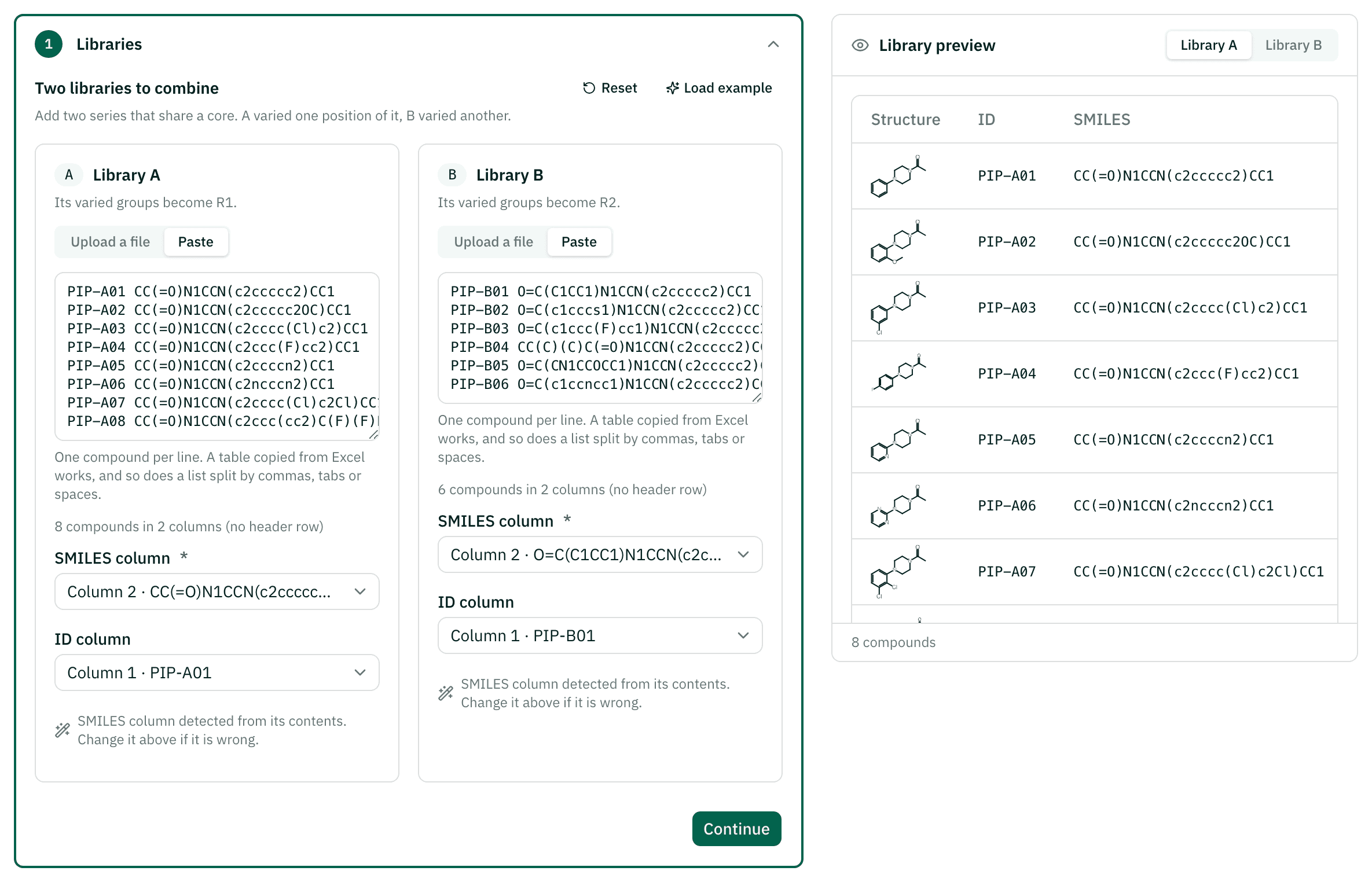
In the Libraries step, drop a file onto A and onto B, or paste a list copied from a spreadsheet. The example is a list with an ID and a SMILES on each line, split by a tab.
Check the columns
The wizard shows the SMILES and ID columns it found and previews the compounds with their structures on the right. If the drawings do not look like molecules, the wrong column was picked; change it in the column picker.
Pick the combination
Once both libraries are ready, the Common Core step finds the shared structure on its own. Here it finds one core,
O=C(N1CCN([*:1])CC1)[*:2], with "8 R1 from A × 6 R2 from B = 48 compounds" already picked. Above it, each library says how many of its compounds were used.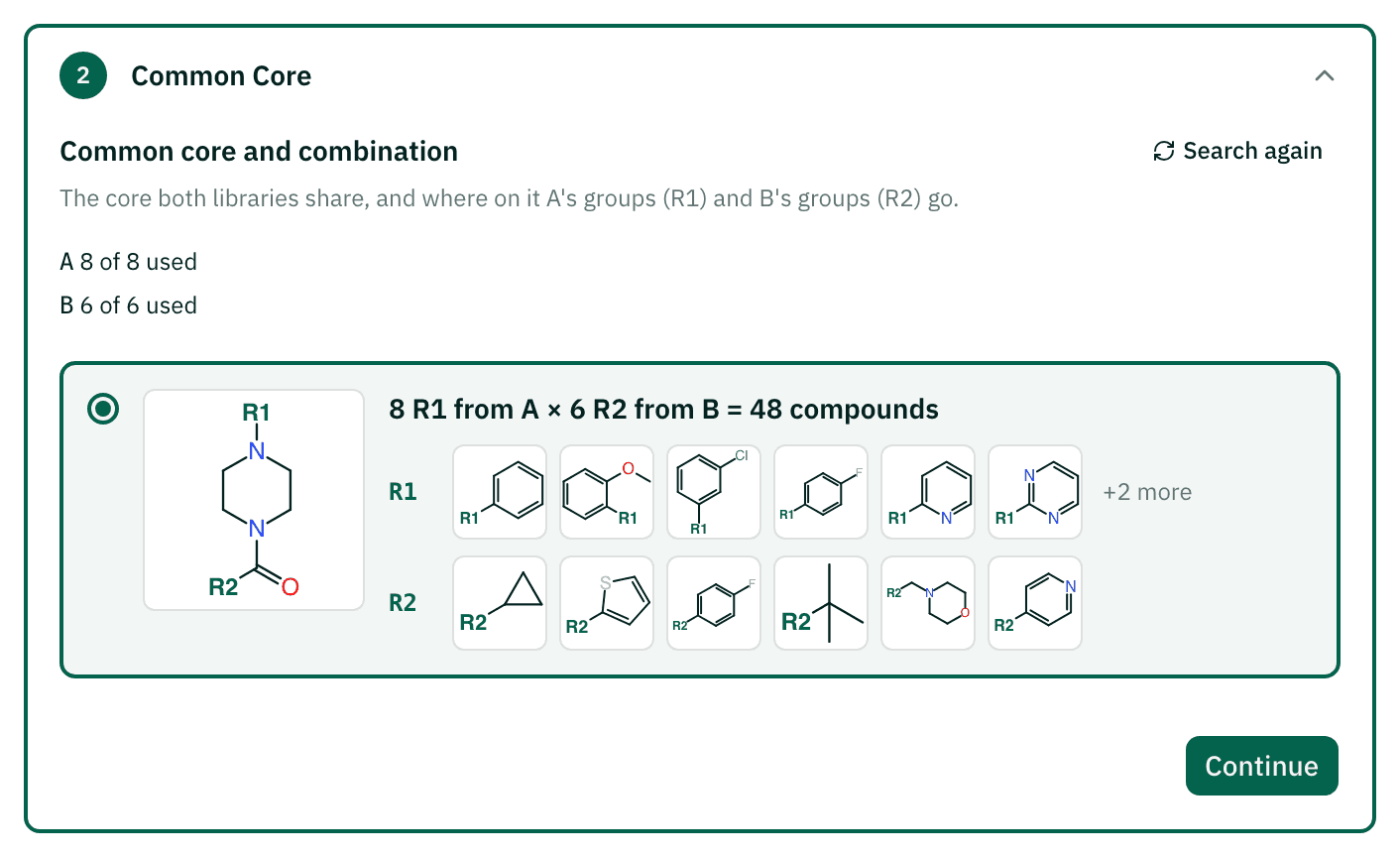
Review and submit
Name the project in Project Settings and submit. The cost is 10 credits whatever the count.
Read the results
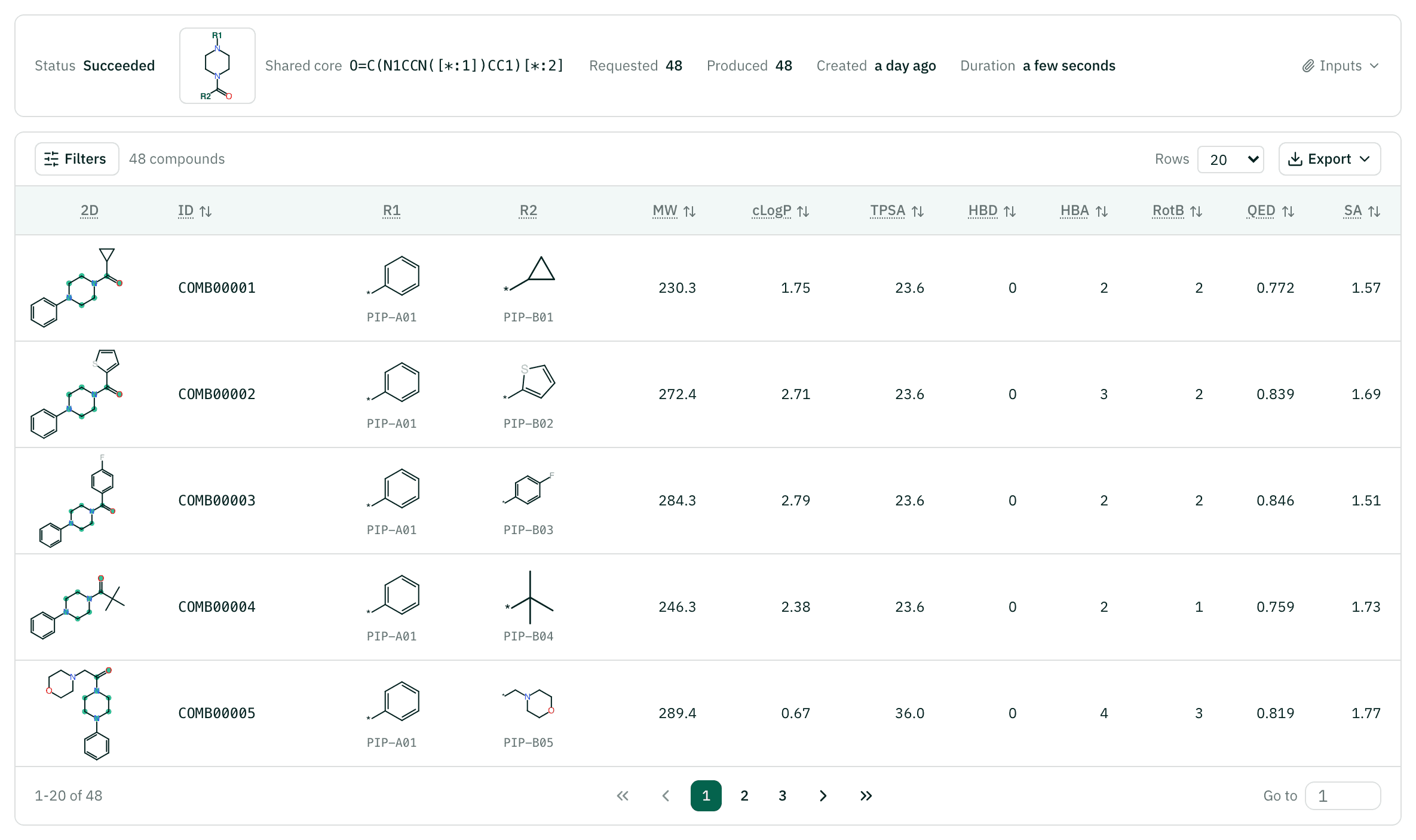
On the results page, filter by property ranges and sort by any property. Each compound also names the library compounds its R1 and R2 came from.
Carry on
Download the compound list and dock it against your target with Virtual Screening, or predict activity with a target model.
Reading the results
| Column | Meaning | How to read it |
|---|---|---|
| ID | Running number from COMB00001 | In the order of A's R1 groups, and within each of those, B's R2 groups |
| 2D | 2D structure with the common core highlighted | A quick check that the core stayed and only the two positions changed |
| R1, R2 | The groups taken from A and from B | Each comes with the ID of the first library compound that carried it, so you can trace it back |
| MW, cLogP, TPSA | Molecular weight, lipophilicity, polar surface | Computed with RDKit on the final joined structure |
| HBD, HBA, RotB | H-bond donors and acceptors, rotatable bonds | The usual drug-likeness counts |
| QED | Drug-likeness, 0–1 | Higher is more drug-like. It folds several properties into one number, so read it next to them |
| SA | Synthetic accessibility, 1–10 | Lower means easier to make, estimated from how common the fragments are and how complex the structure is |
You may get fewer compounds than R1 × R2. Joined structures that do not read as structures are dropped, and two pairings that turn out to be the same compound are merged into one.
Example result: aryl piperazines, 8 × 6
A real job, shown read-only. All 48 pairings joined and none were duplicates. These are the five with the highest QED.
| ID | 2D | R1 | R2 | MW | cLogP | QED | SA |
|---|---|---|---|---|---|---|---|
| COMB00008 | COc1ccccc1[*:1] | c1csc([*:2])c1 | 302.4 | 2.72 | 0.874 | 1.80 | |
| COMB00009 | COc1ccccc1[*:1] | Fc1ccc([*:2])cc1 | 314.4 | 2.80 | 0.873 | 1.63 | |
| COMB00012 | COc1ccccc1[*:1] | c1cc([*:2])ccn1 | 297.4 | 2.05 | 0.870 | 1.77 | |
| COMB00018 | Clc1cccc([*:1])c1 | c1cc([*:2])ccn1 | 301.8 | 2.70 | 0.856 | 1.80 | |
| COMB00021 | Fc1ccc([*:1])cc1 | Fc1ccc([*:2])cc1 | 302.3 | 2.93 | 0.851 | 1.60 |
Cost and limits
A combination job costs 10 credits ($0.01 per credit) whatever its size. Even 50,000 combinations take a little over a minute to compute, and almost all of the elapsed time goes into bringing the compute up, so the price does not follow the number of compounds. Finding the common core is free. The wizard shows the quote before you submit and that is what is deducted.
A library holds up to 1,000 compounds and a job makes up to 50,000. A combination that would make more cannot be picked; use smaller libraries.
The example above (48 compounds) took about 70 seconds from submit to result, of which 67 seconds was waiting for an instance and the computation under 2 seconds, and cost 10 credits.
If the job fails, the credits come back in full. If you stop it yourself, half comes back.
Citations
When you use results from this workflow in a report or paper, please cite the methods below.
- RDKit contributors. RDKit: Open-source cheminformatics. Zenodo (2026). doi:10.5281/zenodo.591637Common core search (MCS), R-group decomposition, joining and properties
- Bickerton GR, Paolini GV, Besnard J, Muresan S, Hopkins AL. Quantifying the chemical beauty of drugs. Nat Chem 4, 90-98 (2012). doi:10.1038/nchem.1243QED drug-likeness
- Ertl P, Schuffenhauer A. Estimation of synthetic accessibility score of drug-like molecules based on molecular complexity and fragment contributions. J Cheminform 1, 8 (2009). doi:10.1186/1758-2946-1-8SA synthetic accessibility score
FAQ
Run the Compound Combination workflow yourself
Sign up and get 500 credits. No card required. You can also choose to get news about new models and workflows.