

TSAP (AI-QSAR)
Docking-based activity prediction you can read feature by featurePredict how active your compounds are against one target with a QSAR model built on docking. Each compound is docked into an ensemble of receptor structures, its poses are described by interaction and shape features, and a linear model trained on measured activities turns those features into a prediction. You can see which features push the prediction up or down.
Boltz-2 ensemble + GNINA 1.3.1 + PLIP + Ridge regression · Doc updated Oct 14, 2026
- Input
- Activity data, or a pre-trained model
- Output
- Predicted activity, feature effects
- Engine
- GNINA, PLIP, scikit-learn
- Cost
- From 100 cr, quoted before submit
- Job limit
- 24 hours
When to use
- You have measured activities for at least 30 compounds on one target and a structure with a ligand bound
- Your target is in the pre-trained catalog and you want activity predictions without your own data
- You want to know why a compound scores well: which interactions and properties drive the prediction
- You want a second opinion next to TSAP (Boltz-2), from a different kind of model
Predictions are most reliable for compounds that resemble the training set and dock into the same site. Compounds whose poses miss the site are left out of training and prediction.
How it works
- 01Build a receptor ensemble
Boltz-2 folds the target with its reference ligand several times, giving a set of slightly different pocket shapes. Pre-trained models bring their own ensemble.
- 02Dock into each shape
GNINA docks every compound into each ensemble member, in a box around the reference ligand.
- 03Keep good poses
A pose is kept when its CNN pose score is high enough and its shared core sits close to the reference ligand (or, for some models, it touches the same residues).
- 04Describe and predict
Each kept pose is described by docking scores, RDKit 2D and 3D descriptors, PLIP interaction counts per residue and a hydrogen-bond charge term. Features are averaged per compound and a Ridge regression model turns them into predicted activity.
Input formats
| Item | Accepted | Notes |
|---|---|---|
| Model | A pre-trained catalog model, or train a new one | Each card shows the target, reference structure, number of training compounds and holdout accuracy. A pre-trained model fixes its own docking and filter settings |
| Target (training) | 4-character PDB ID, or a .pdb/.cif upload, with a ligand bound | The bound ligand is the reference: the docking box is drawn around it and the chains within 4 Å of it are kept. Water, ions and additives such as GOL are not offered |
| Activity data (training) | .txt, .csv or .tsv with a header row: SMILES, activity value, optional ID | At least 30 compounds, counted again after the pose filter, so bring extra. One unit per job (M down to fM, or values already on a p-scale) |
| Compounds to predict | .txt, .smi or .csv, one per line: SMILES, or ID then a tab then SMILES | At least one with a pre-trained model, optional when training. IDs are assigned if missing |
| Count | No fixed maximum | A job that would run past the 24-hour limit is blocked, and the quote tells you the largest number of compounds that fits |
When you train, Advanced Settings set the ensemble size (Quick 3, Balanced 5, Standard 10 structures, up to 30), the pose filter (CNN pose score 0.5 and core RMSD 2.5 Å by default) and the feature search (10–30 features, 100 repeats). The data is split 8:2 into training and validation, spread across the activity range.
Tutorial: predict EGFR activity
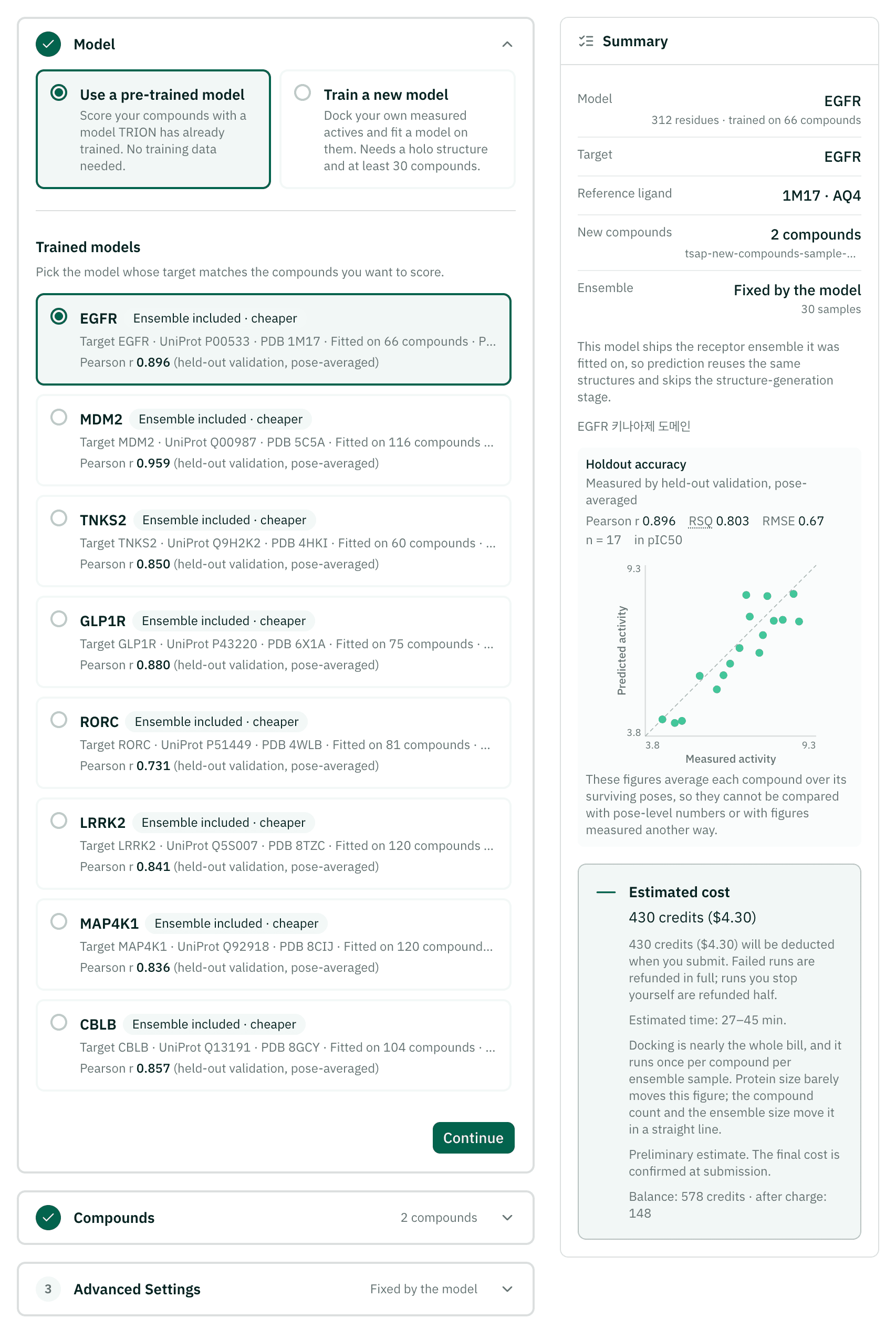
EGFR, the lung cancer target from the Virtual Screening and AI-Cofolding docs, has a pre-trained AI-QSAR model in the catalog with PDB 1M17 as its reference structure, so you only need the compounds you want scored. Run example at the top of this page fills all of this in for you.
Pick the model
In Model, keep Use a pre-trained model and choose the EGFR card. Check its holdout accuracy and how many compounds it was trained on.
Add compounds
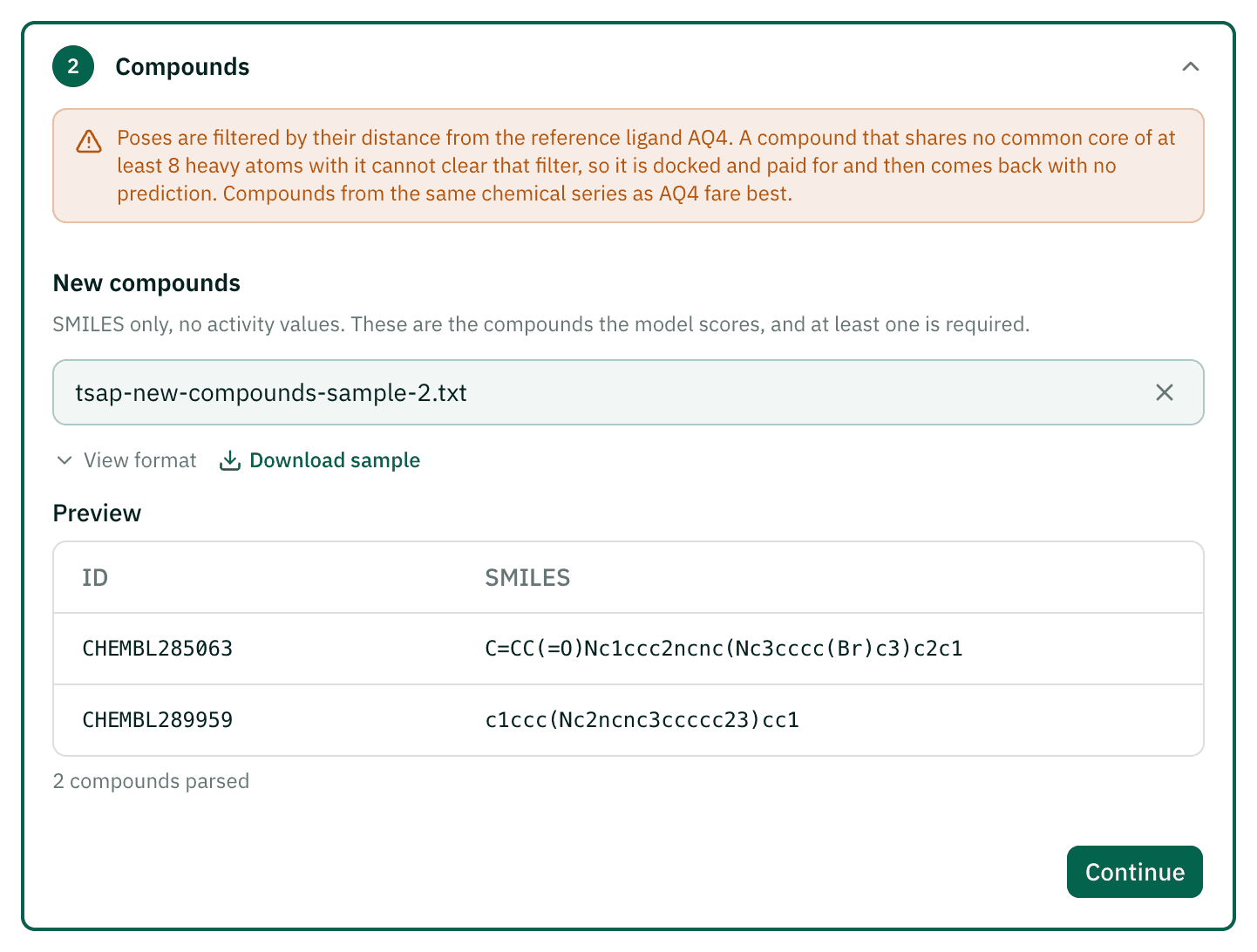
In Compounds, upload your compound file. The preview shows the rows that will be predicted. The example uses two compounds from the EGFR sample file, because every compound is docked into each receptor structure of the model.
Check the quote and submit
Advanced Settings follow the model. In Project Settings, name the project, check the quoted credits and time, and submit.
Read the predictions and the features
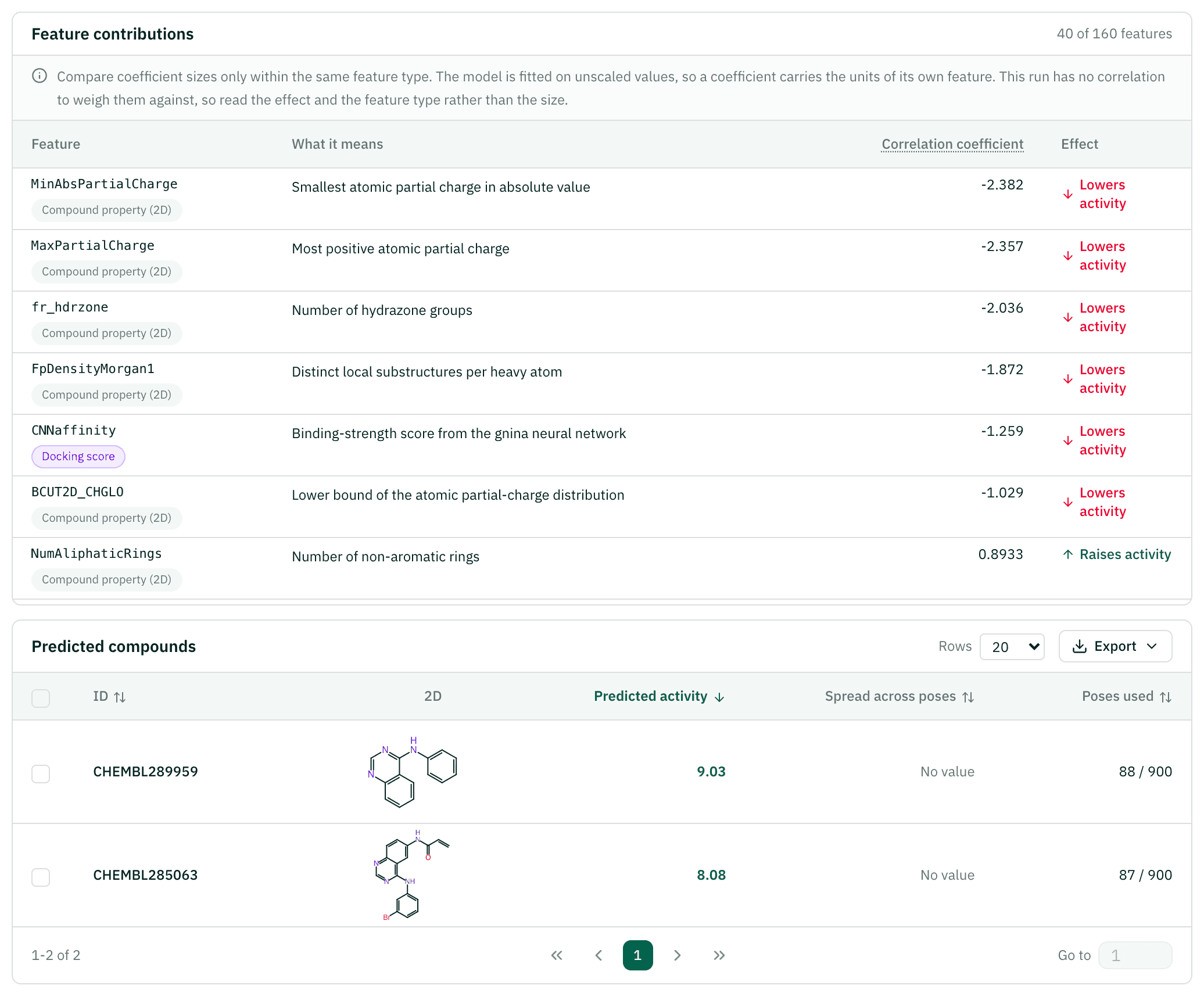
Open the project. Sort by predicted activity, check how many poses each prediction used, and look at the feature contributions to see what drives the model.
Reading the results
| Value | Meaning | How to read it |
|---|---|---|
| Predicted activity | Predicted pActivity (−log10 of the molar value) | Higher is more active. 7.0 and above is counted as promising |
| Spread | How much the prediction varies across the compound's poses | A large spread means the poses disagree |
| Poses used / generated | Poses that passed the filter, out of all docked | Predictions from only 1–2 poses are marked low confidence |
| Excluded | Compounds with no usable pose, with the reason | For example no pose passed the score filter, or no shared core with the reference |
| Feature contributions | Each selected feature's coefficient and direction, in six groups | Compare sizes only within one group: features are not scaled to a common unit |
| RSQ, Pearson r, RMSE | Accuracy on the model's holdout compounds | Measured when the model was trained, on its own data, averaged per compound |
RSQ is the squared Pearson correlation. The holdout RSQ also helped choose the final model, so read it as an optimistic estimate.
Example result: EGFR
A real job, shown read-only. Sign in to run the same setup yourself.
| Compound | Predicted | Poses used | Best CNN score |
|---|---|---|---|
| CHEMBL289959 | 9.03 | 88 | 0.932 |
| CHEMBL285063 | 8.09 | 87 | 0.958 |
Cost and time
The price follows the GPU time the job needs, which grows with the number of compounds times the number of receptor structures each one is docked into. The wizard shows the server's quote, and you pay exactly that at submit. The minimum is 100 cr (1 cr is $0.01).
The EGFR example above (two compounds) took about 16 minutes from submit to results and cost 430 cr.
If the job fails, the credits come back in full. If you stop it yourself, half comes back.
Citations
If you use these results in a report or paper, please cite the methods below.
- Passaro S, Corso G, Wohlwend J, et al.. Boltz-2: Towards accurate and efficient binding affinity prediction. bioRxiv (2025). doi:10.1101/2025.06.14.659707Receptor ensemble by cofolding
- McNutt AT, Francoeur P, Aggarwal R, Masuda T, Meli R, Ragoza M, Sunseri J, Koes DR. GNINA 1.0: molecular docking with deep learning. J Cheminform 13, 43 (2021). doi:10.1186/s13321-021-00522-2Docking and CNN pose scores
- Adasme MF, Linnemann KL, Bolz SN, Kaiser F, Salentin S, Haupt VJ, Schroeder M. PLIP 2021: expanding the scope of the protein-ligand interaction profiler to DNA and RNA. Nucleic Acids Res 49, W530-W534 (2021). doi:10.1093/nar/gkab294Protein–ligand interaction features
- RDKit contributors. RDKit: Open-source cheminformatics. Zenodo (2026). doi:10.5281/zenodo.5916372D and 3D descriptors
- Raček T, Schindler O, Toušek D, Horský V, Berka K, Koča J, Svobodová R. Atomic Charge Calculator II: web-based tool for the calculation of partial atomic charges. Nucleic Acids Res 48, W591-W596 (2020). doi:10.1093/nar/gkaa367Partial charges for the hydrogen-bond charge term (ChargeFW2)
- Pedregosa F, Varoquaux G, Gramfort A, et al.. Scikit-learn: Machine learning in Python. J Mach Learn Res 12, 2825-2830 (2011). https://jmlr.org/papers/v12/pedregosa11a.htmlRidge regression and feature selection